Tool
Firmware
Load firmware onto the Teensy from the browser.
Load firmware to your Teensy via WebHID. How to flash:
- Open TŒRN and connect it (or the Teensy directly) via USB to this computer so it is powered on.
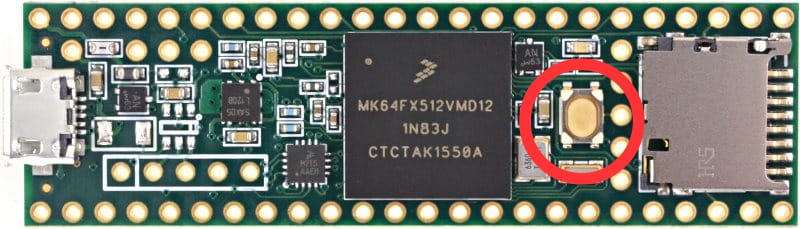
- Press the reset button (marked red). The small LED on the Teensy lights up red — it is now in programming mode.
- Press Select Teensy Device, choose Teensy in the list (it may show as “Unknown device”), then press Connect.
- Press Upload Firmware. The Teensy LED flashes brighter a few times.
- After a successful flash, TŒRN reboots automatically.
1. Firmware
This page flashes version 3.0.
2. Device & Flash
With the Teensy in programming mode (red LED on), select the device, then upload.